Project Portfolio

An overview of some of the projects I have worked on


Portfolio Optimization Web App with Python
Streamlit Logo Python Logo

Overview

The Portfolio Optimization Model is an interactive web application built with Python and Streamlit, utilizing Modern Portfolio Theory and Convex Optimization to help users analyze and optimize their financial portfolios. The app provides tools to calculate key metrics, simulate optimal portfolio allocations, and visualize portfolio performance.

Key Features

  • Interactive Portfolio Analysis: Allows users to input stock tickers and growth targets, calculating key metrics like returns, volatility, and Sharpe ratios.
  • Optimization & Simulations: Applies convex optimization and simulates the Efficient Frontier to suggest the best portfolio allocations.
  • Visualization Tools: Generates dynamic charts and heatmaps for asset correlations and performance breakdowns, providing real-time insights.

Tools and Technologies

  • Python & Streamlit: Used to create the interactive web application and handle user inputs.
  • Data Libraries: NumPy and Pandas for data manipulation, Plotly for visualizations, and cvxpy for optimization.
  • Yahoo Finance API: Retrieves historical stock and index data for analysis.

Financial Statement Analysis with Powerpoint
Powerpoint Logo Powerpoint Logo

Overview

Completed the New York Jobs CEO Council Financial Analyst Job Simulation on Forage.

  • Completed a Simulation focused on financial analysis as an Analyst on the technology team at an investment bank.
  • Played a pivotal role in aiding senior bankers to determine the feasibility of establishing a partnership with BigTechCompany.
  • Demonstrated strong communication skills by articulately presenting findings and opinions to senior bankers.

Data Cleaning with SQL
SQL Logo

Overview

This project focuses on cleaning and transforming the Nashville Housing database using SQL to ensure data accuracy and consistency for analysis. Common tasks like updating date formats, handling NULL values, splitting columns, and removing duplicates are performed to enhance data integrity and usability.

Key Features

  • Data Cleaning: Various techniques are applied to address incomplete or inconsistent data and enhance its usability.
  • Standardization: Data values are standardized for better clarity and consistency across the dataset.
  • Data Simplification: Redundant information is removed, and the dataset is streamlined for efficient analysis.

Tools and Technologies

  • SQL Server & Functions: SQL Server and various functions like CONVERT(), ISNULL(), and ROW_NUMBER() are used for data manipulation.
  • Self-Joins & CTEs: Self-joins address NULL values, and CTEs help in identifying and removing duplicate records.
  • Data Transformation: SQL techniques facilitate column splitting, standardization, and elimination of irrelevant information.
Data Professionals Survey Analysis with PowerBI
PowerBI Logo

Overview

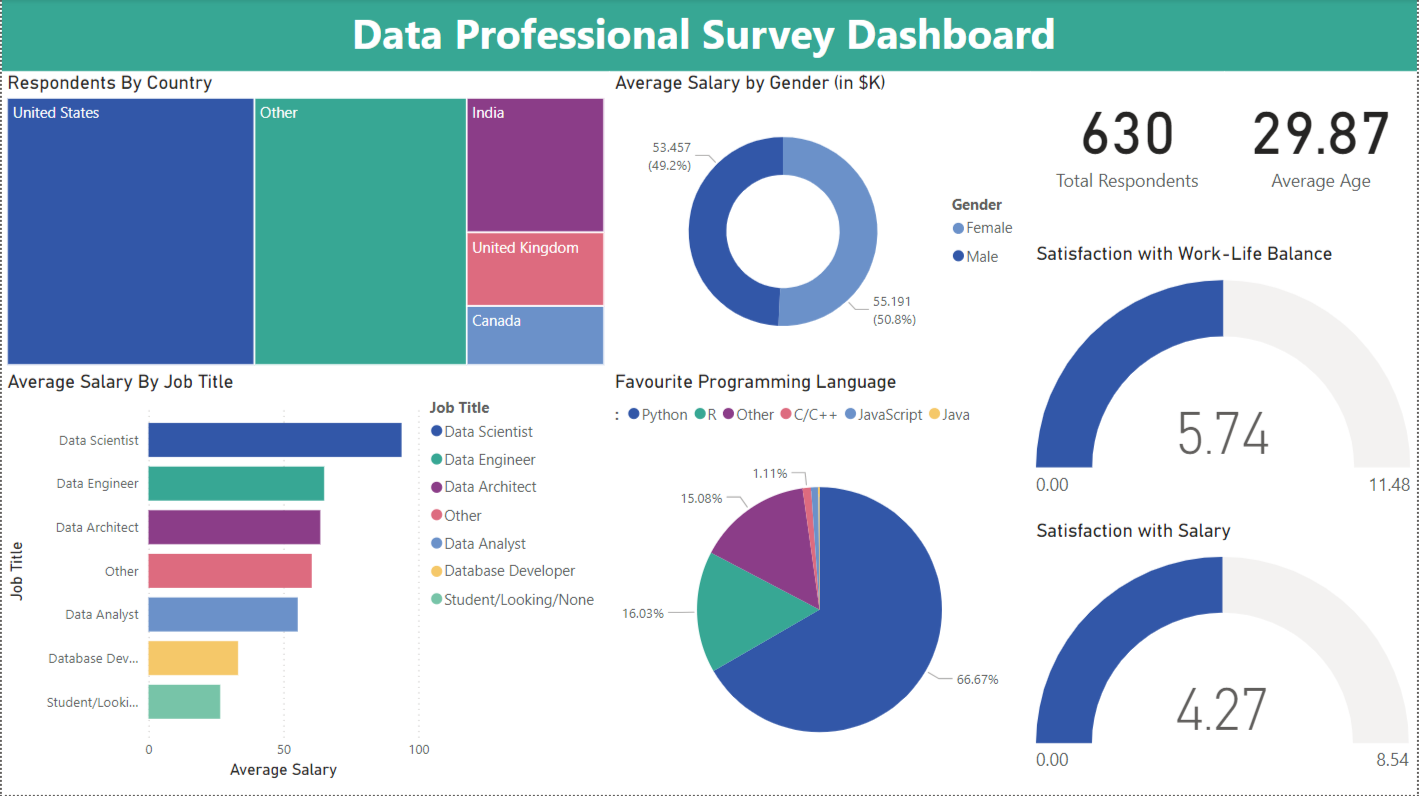
This project utilizes Power BI to analyze a survey dataset, uncovering insights into the data profession, including salary trends, job satisfaction, and demographic influences on career paths. The interactive dashboard aims to provide valuable information for professionals and employers to understand industry trends and identify improvement areas.

Key Features

  • Data Analysis: Key metrics like salary distribution and job satisfaction are analyzed to uncover patterns and trends.
  • Interactive Visualizations: The dashboard features interactive charts and slicers, allowing users to explore data by various demographics and career factors.
  • Actionable Insights: The project highlights areas of interest, such as salary gaps and programming language popularity, to guide decision-making in the data profession.

Tools and Technologies

  • Power BI: Power BI is used for data cleaning, transformation, and creating interactive visualizations.
  • Power Query & DAX: Power Query Editor is utilized for data preparation, while DAX expressions calculate key metrics and aggregations.
  • Interactive Dashboards: Interactive elements such as slicers and tooltips enhance data exploration and user engagement.

Note: This project is inspired by and builds upon the work of Alex The Analyst, whose contributions and tutorials were invaluable in shaping this project.

Dynamic DCF Valuation and Financial Modeling in Excel
Excel Logo

Overview

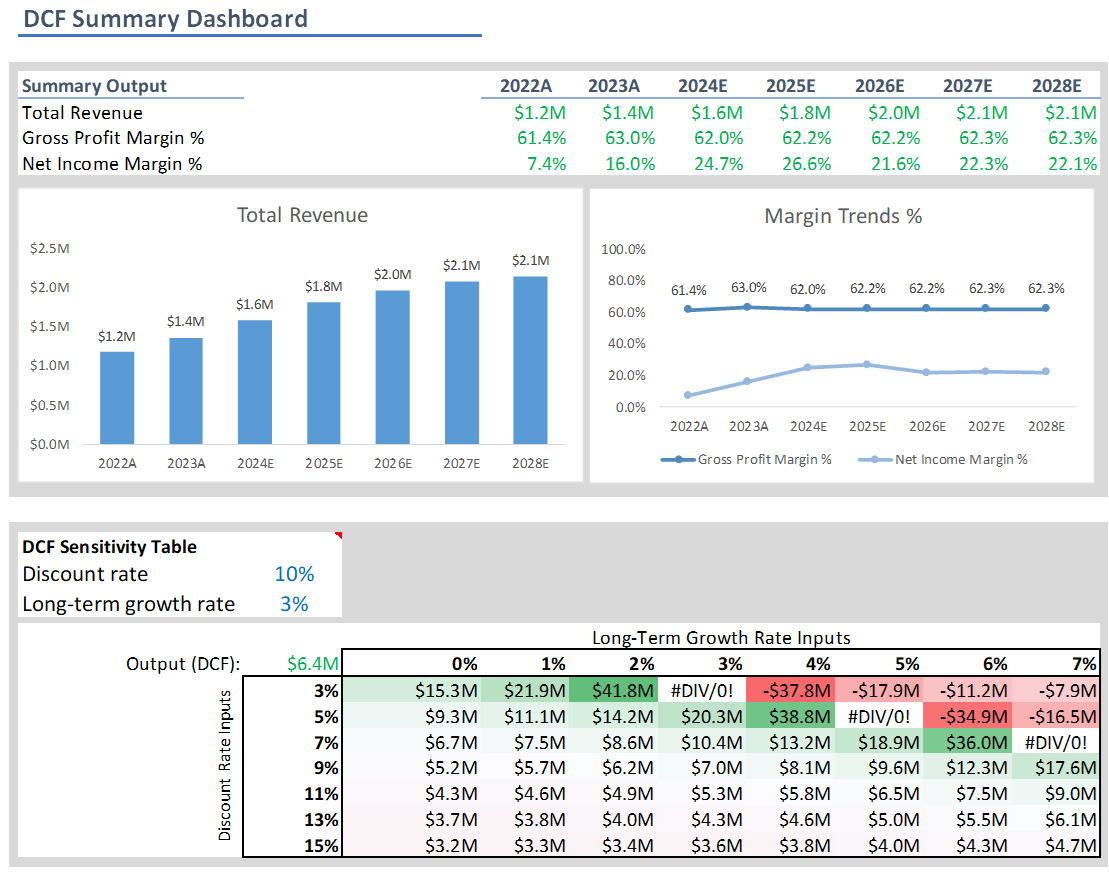
This project develops a comprehensive financial model that integrates key financial statements—Income Statement, Balance Sheet, and Cash Flow Statement—to assess company performance and valuation. The Excel-based model includes dynamic features for financial forecasting, discounted cash flow analysis, and scenario exploration.

View Project

Key Features

  • Interlinked Financial Statements: Provides a unified view of the company's financial health through integrated statements.
  • DCF Valuation & Sensitivity Analysis: Estimates intrinsic value using projected cash flows, terminal value, and sensitivity analysis with WACC and growth rate variations.
  • Dynamic Dashboard: Visualizes key metrics and enables scenario analysis, displaying forecasted values and financial performance.

Tools and Technologies

  • Excel: Microsoft Excel is used to build the financial model, perform calculations, and create interactive dashboards.
  • Scenario Analysis: Assumptions columns allow users to adjust the model based on different business scenarios.
  • Dynamic Charts & Tables: Interactive charts and tables are included to display financial projections and valuation sensitivities.

Note: This project is inspired by and builds upon the work of Financial Analyst Network, whose guidance was invaluable in shaping this project.

Momentum Investment Strategy with Python
Python Logo

Overview

This project implements a momentum-based investment strategy to select top-performing stocks from the S&P 500 index, identifying those with the best historical returns across various time frames. The strategy calculates the optimal number of shares to purchase for a given portfolio size, aiming to capitalize on strong upward trends in stock performance.

View Code

Key Features

  • Momentum Strategy: Stocks are ranked based on their returns over multiple time periods, and a High-Quality Momentum (HQM) score is calculated to assess top performers.
  • Portfolio Construction: The project determines the optimal number of shares to buy, ensuring an equal-weighted investment approach within the specified portfolio size.
  • Results Export: The final list of selected stocks and their corresponding share quantities are exported to an Excel file for further review and analysis.

Tools and Technologies

  • Yahoo Finance API: Used to fetch daily adjusted closing price data for S&P 500 stocks.
  • Python: Python is utilized for data collection, analysis, and portfolio construction.
  • Excel (xlsxwriter): Results are exported to an Excel file for easy presentation and further processing.
Market Analysis and Visualization with Tableau
Tableau Logo

Overview

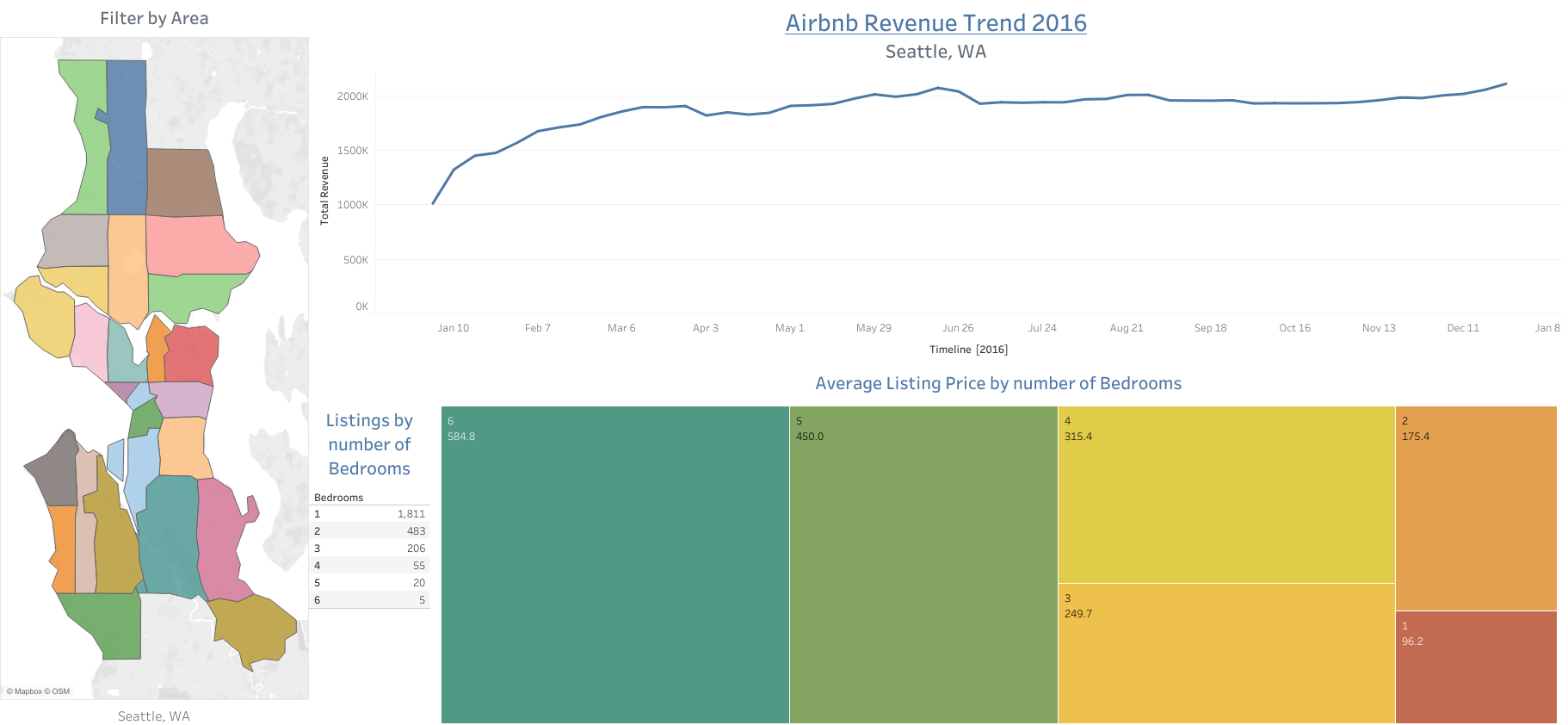
This project analyzes Airbnb trends in Seattle to identify optimal locations and property types for starting an Airbnb business. By examining pricing, revenue, and competition data, the project provides actionable insights for potential hosts to make informed investment decisions.

Key Features

  • Pricing and Revenue Trends: The analysis highlights areas with lucrative pricing opportunities and seasonality patterns to optimize revenue potential.
  • Property Features and Competition: It explores how property features affect pricing and assesses market saturation to help identify areas with lower competition.
  • Interactive Visualizations: Multiple charts, maps, and time series are used to provide a comprehensive view of the data, allowing for deeper insights into trends.

Tools and Technologies

  • Tableau: Used for data cleaning, joining datasets, and creating interactive visualizations.
  • Maps & Visualizations: Geographic and time-based visualizations are incorporated to explore pricing and competition trends.
  • Dashboard: All visualizations are integrated into a user-friendly dashboard for easy exploration and decision-making.

Note: This project is inspired by and builds upon the work of Alex The Analyst, whose contributions and tutorials were invaluable in shaping this project.

Data Exploration with SQL
SQL Logo

Overview

This project analyzes COVID-19 data using SQL queries to explore global and regional trends in infection rates, death rates, and vaccination progress. By querying large datasets, the project identifies key patterns and provides insights into the pandemic's impact across different countries and regions.

Key Features

  • Global and Regional Analysis: Analyzes trends in COVID-19 cases, deaths, and vaccination rates at global and country levels.
  • Death and Infection Rate Calculation: Calculates death and infection rates for various regions to understand the severity of the pandemic.
  • Vaccination Progress: Tracks vaccination data, calculating the percentage of the population vaccinated in different countries.

Tools and Technologies

  • SQL Server: Used to query and manipulate data from the CovidDeaths and CovidVaccinations tables.
  • SQL Functions & CTEs: SQL functions like SUM(), CAST(), and PARTITION BY are applied for data aggregation and analysis.
  • TEMP Tables & Views: TEMP tables store intermediate data, and SQL views simplify querying aggregated vaccination data.
Clash of Clans Dashboard in Google Sheets
Google Sheets Logo

Overview

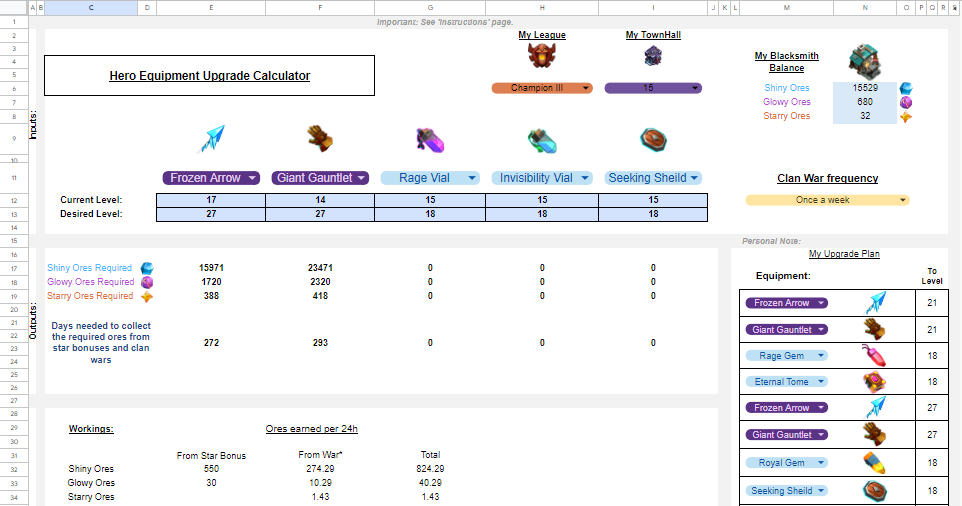
This project began as a personal tool during my time playing Clash of Clans and evolved into a comprehensive resource to optimize Hero Equipment upgrades. The challenge in Clash of Clans is managing upgrades due to resource collection, costs, and time. This tool simplifies planning by providing a structured, interactive Google Sheets-based calculator.

Upon receiving positive feedback on Reddit, I documented it on GitHub.

Approach and Methodology

  • Data Input: Players enter details like their Townhall Level, Trophy League, blacksmith balance, and Clan War frequency into the tool.
  • Dynamic Calculation: The tool uses formulas and lookup tables to calculate the required resources and time needed for upgrades based on user inputs.
  • Visual Feedback: Visual cues and error messages guide users in entering valid data and understanding the results.
  • Customization: The tool provides personalized upgrade paths, aiding players in making more strategic and informed decisions for faster progression.

Screenshots:

A Townhall 15 at Champion III that wars once a week and has a blacksmith balance of 15,529 Shiny Ores, 680 Glowy Ores, and 32 Starry Ores will need 272 days to upgrade Frozen Arrow from level 17 to 27.

The Dashboard will look like this: Example Dashboard

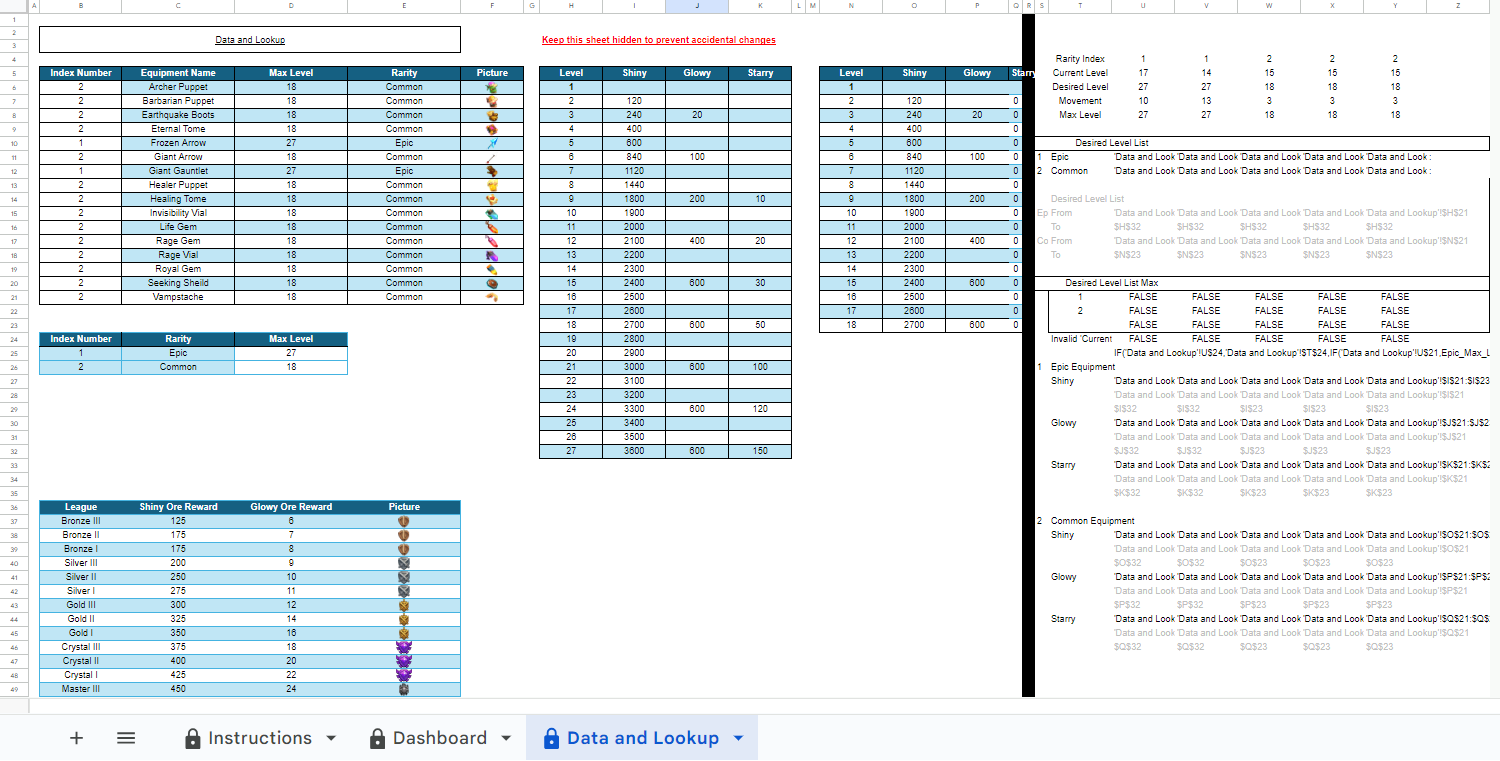
The hidden Data and Lookup sheet is where the data modeling happens:

Personal Website and Blog
HTML Logo CSS Logo

Overview

This personal website was created to showcase my professional resume, portfolio, and contact details in an organized and accessible format. What started as a simple online resume has evolved into a multi-page personal hub, reflecting my growth in web development and my self-driven learning journey.

View Code

Development Process

  • Inspiration & Foundation: The inspiration for this website was a basic resume template from W3Schools.com.
  • Learning HTML & CSS: With no formal computer science background, I taught myself HTML and CSS through free online resources to build the website from scratch. The initial learning curve was steep, and progress was slow at first, but as I continued, I became more proficient.
  • Gradual Expansion: Over time, I expanded the site by adding new sections, such as home, portfolio, contact pages. A blog page was added to further enrich the content and boost engagement.
  • Continuous Improvement: I continuously worked on improving the UI by refining navigation, styling, and embedding interactive elements like widgets and forms.
  • Customization & Feedback: To refine the website’s design and functionality, I used generative AI tools for design suggestions and optimizations. AI chatbots also helped me set up the JavaScript needed for interactive elements. It's impossible to overstate how crucial they have been in this endeavor.
  • Mobile Responsiveness: Ensuring a seamless experience across devices was a priority, so I focused on making the site mobile-responsive. I used rem units for dimensions and incorporated media queries to optimize the layout for different screen sizes.
Portfolio Risk Analysis with Python
Python Logo

Overview

This project analyzes individual stocks and their performance within a portfolio context, calculating key metrics like risk, return, variance, covariance, and portfolio risk decomposition using historical data from Yahoo Finance. The analysis helps investors understand how individual stocks perform and interact within a diversified portfolio to optimize risk and return.

Key Features

  • Individual Stock Analysis: Calculates risk, return, volatility, and the relationship between stocks using covariance and correlation.
  • Portfolio Risk and Return: Assesses the total variance of a portfolio and decomposes the overall risk into diversifiable and non-diversifiable components.
  • Visualization: Visualizes stock price movements and risk metrics to aid in interpretation and decision-making.

Tools and Technologies

  • Yahoo Finance: Historical stock data is fetched using the Yahoo Finance API through the yfinance library.
  • Quantitative Methods: Various statistical methods are applied to calculate risk, return, and the relationship between stocks.
  • Visualization: Graphs and charts are used to visualize stock performance and portfolio risk for better analysis.
Bank Statement Analysis in Excel
Excel Logo

Overview

This project processes raw bank statements to create a user-friendly and interactive Excel file that summarizes financial transactions. By leveraging data processing and visualization techniques, it provides a concise overview of the firm's financial activities, helping to manage cash flow, monitor expenses, and prepare for audits.

Key Features

  • Data Processing: Raw bank data is imported, cleaned, and transformed using Excel’s Power Query Editor.
  • Interactive Sheets: Includes interactive features like slicers, dropdowns, and conditional formatting for easy exploration of financial data.
  • Summary and Detailed Views: Provides a monthly transaction overview and detailed accounting of issued checks with dynamic, user-friendly summaries.

Tools and Technologies

  • Excel Power Query: Used for importing and processing raw data from text/CSV files.
  • Excel Features: Slicers, dropdowns, and conditional formatting enhance user interactivity and data exploration.
  • Data Visualization: Interactive and visually organized sheets provide insights into financial health.
Portfolio Returns and CAGR Analysis with Python
Python Logo

Overview

This project analyzes individual stock performance and portfolio returns using Python, calculating key metrics like simple and log returns, cumulative returns, and Compound Annual Growth Rate (CAGR). The framework helps investors evaluate both individual stocks and the overall performance of their portfolios to make more informed investment decisions.

Key Features

  • Stock Analysis: Calculates daily and annualized simple and log returns, as well as cumulative returns and CAGR for individual stocks.
  • Portfolio Evaluation: Analyzes portfolio performance by comparing relative price movements and calculating weighted average returns and overall growth.
  • Visualization: Generates charts to visually compare return distributions, price movements, and performance across multiple stocks and portfolios.

Tools and Technologies

  • Python Libraries: Utilized Yahoo Finance API for data retrieval, along with libraries for data analysis and visualization.
  • Data Analysis: Calculated performance metrics and growth rates using Python’s data manipulation capabilities.
  • Visualization: Plotted stock and portfolio performance to provide clear, actionable insights for investors.
Three-Statement Financial Model in Excel
Excel Logo

Overview

This Excel-based financial model provides a comprehensive three-statement forecast for a consumer goods firm, including detailed Profit & Loss, Balance Sheet, and Cash Flow statements. It allows users to analyze different financial scenarios by adjusting key assumptions and drivers, supporting business planning and decision-making.

Key Features

  • Three-Statement Forecast: Develops a four-year forecast for the P&L, Balance Sheet, and Cash Flow statements.
  • Scenario Analysis: Enables users to adjust financial drivers and evaluate different business scenarios.
  • Supporting Schedules: Includes schedules for fixed assets, financial liabilities, and equity, essential for accurate forecasting.

Tools and Technologies

  • Excel: Used for building and organizing the financial model and conducting scenario analysis.
  • Data Cleaning: Processed historical data to prepare it for analysis and forecasting.
  • Financial Modeling: Applied financial ratios and forecasting techniques to project key financial statements.
CAPM Analysis and Risk-Return Evaluation with Python
Python Logo

Overview

This project explores the Capital Asset Pricing Model (CAPM) and its applications in financial analysis, using the stocks of Walmart Inc, Coca-Cola Co, Lockheed Martin Corp, and Pfizer Inc as examples. By calculating beta values, expected returns, and Sharpe Ratios, the project demonstrates how investors can assess the risk and return of securities to make more informed investment decisions.

Key Features

  • Beta Calculation: Computes the sensitivity of stock returns to market movements, providing insights into risk exposure.
  • Expected Returns: Uses the CAPM formula to estimate the expected returns based on the risk-free rate and equity risk premium.
  • Sharpe Ratio: Evaluates the risk-adjusted returns, allowing for a better understanding of the performance relative to the risk taken.

Tools and Technologies

  • Python: Used for data retrieval, analysis, and calculations, including the Yahoo Finance API and financial metrics.
  • CAPM and Sharpe Ratio: Fundamental financial models used to assess risk, return, and performance of stocks.
  • Data Analysis: Monthly log returns are calculated to analyze stock performance and evaluate risk-adjusted returns.
Automated Cash Register System in Excel
Excel Logo

Overview

This Excel-based system automates the tracking and categorization of financial transactions, making it easier for users to manage their finances. It organizes transactions by type and details, and generates a summary for each month to provide an overview of financial activity.

How It Works

  • Transaction Entry: Users input transaction details—date, type, particulars, and amount—into the 'Register' sheet.
  • Automatic Summary: The 'Summary' sheet is dynamically updated with categorized transactions for each month, enabling users to review their financial data.

Key Formulas Used

  • Populate Transaction Type and Particulars:

    = SORT(UNIQUE(FILTER('Register'!$D:$E, ('Register'!$D:$D<>"" ) + ('Register'!$E:$E<>"" )))

    This formula filters and sorts the transaction types and particulars from the 'Register' sheet.

  • Obtain Corresponding Summary:

    = SUMIFS('Register'!$F:$F, 'Register'!$D:$D, Summary!$B5, 'Register'!$E:$E, Summary!$C5, 'Register'!$G:$G, Summary!D$2)

    This formula sums the transaction amounts based on the selected type, particulars, and month, providing the monthly summary.